Zujoki
Zujoki
Rewards & Ranks
LoginLogin
Zujoki

Play free online games on Zujoki with zero downloads. Enjoy popular browser games across action, racing, puzzle, and multiplayer categories on PC, tablet, and mobile.

⚡ Instant Play📱 Mobile Ready🎮 No Installation

Popular Categories

  • Action Games
  • Car & Racing Games
  • Puzzle & Brain Games
  • Multiplayer Games
  • Arcade Games
  • Sports Games

Platform Links

  • Browse Games
  • Blog & News
  • Puzzle
  • Contact Us
  • Privacy Policy

About Zujoki

Zujoki is a free browser gaming hub delivering high-performance web games for gamers of all ages. Safe, fast, and unblocked on all modern web browsers.

© 2026 Zujoki. All rights reserved.

All games and trademarks belong to their respective creators.

HomeRecently playedNewPopular gamesUpdatedOriginals

Categories

  • All games18
  • 3d6
  • Action9
  • Adventure1
  • Arcade9
  • Army0
  • Battle1
  • Battle royale0
  • Bike1
  • Biker0
  • Block0
  • Board2
  • Car3
  • Cars0
  • Casual9
  • Challenge0
  • Chess1
  • Coins0
  • Color0
  • Competition0
  • Crafting0
  • Crazy0
  • Creative0
  • Creativity0
  • Drift1
  • Drive0
  • Driving3
  • Endless runner2
  • Fighting1
  • Flight1
  • Fps1
  • Fun0
  • Html50
  • Idle1
  • Io2
  • Kids0
  • Ludo0
  • Management1
  • Matching1
  • Math0
  • Moto0
  • Multiplayer4
  • Neon0
  • Physics3
  • Platformer1
  • Puzzle4
  • Racing3
  • Runner3
  • Running0
  • Sci‑fi0
  • Shooter2
  • Simulation2
  • Skill5
  • Skills0
  • Sport0
  • Sports0
  • Stickman1
  • Strategy4
  • Stunt1
  • Task0
  • Territory0
  • Thinking2
  • Traffic0
  • Troll0
  • Uno0

Community

Menu

View style

HomeRecently playedNewPopular gamesUpdatedOriginals

Categories

  • All games18
  • 3d6
  • Action9
  • Adventure1
  • Arcade9
  • Army0
  • Battle1
  • Battle royale0
  • Bike1
  • Biker0
  • Block0
  • Board2
  • Car3
  • Cars0
  • Casual9
  • Challenge0
  • Chess1
  • Coins0
  • Color0
  • Competition0
  • Crafting0
  • Crazy0
  • Creative0
  • Creativity0
  • Drift1
  • Drive0
  • Driving3
  • Endless runner2
  • Fighting1
  • Flight1
  • Fps1
  • Fun0
  • Html50
  • Idle1
  • Io2
  • Kids0
  • Ludo0
  • Management1
  • Matching1
  • Math0
  • Moto0
  • Multiplayer4
  • Neon0
  • Physics3
  • Platformer1
  • Puzzle4
  • Racing3
  • Runner3
  • Running0
  • Sci‑fi0
  • Shooter2
  • Simulation2
  • Skill5
  • Skills0
  • Sport0
  • Sports0
  • Stickman1
  • Strategy4
  • Stunt1
  • Task0
  • Territory0
  • Thinking2
  • Traffic0
  • Troll0
  • Uno0

Community

HomeSimulationMonkey Mart
No Zujoki ads
Simulation
Management
Idle
Casual
Strategy

Monkey Mart

Monkey Mart

Monkey Mart

Click below to start playing instantly in your browser

🔑 Log in to earn Score & Coins!

About Monkey Mart

Developed by TinyDobbins

Game Description

About Monkey Mart Online

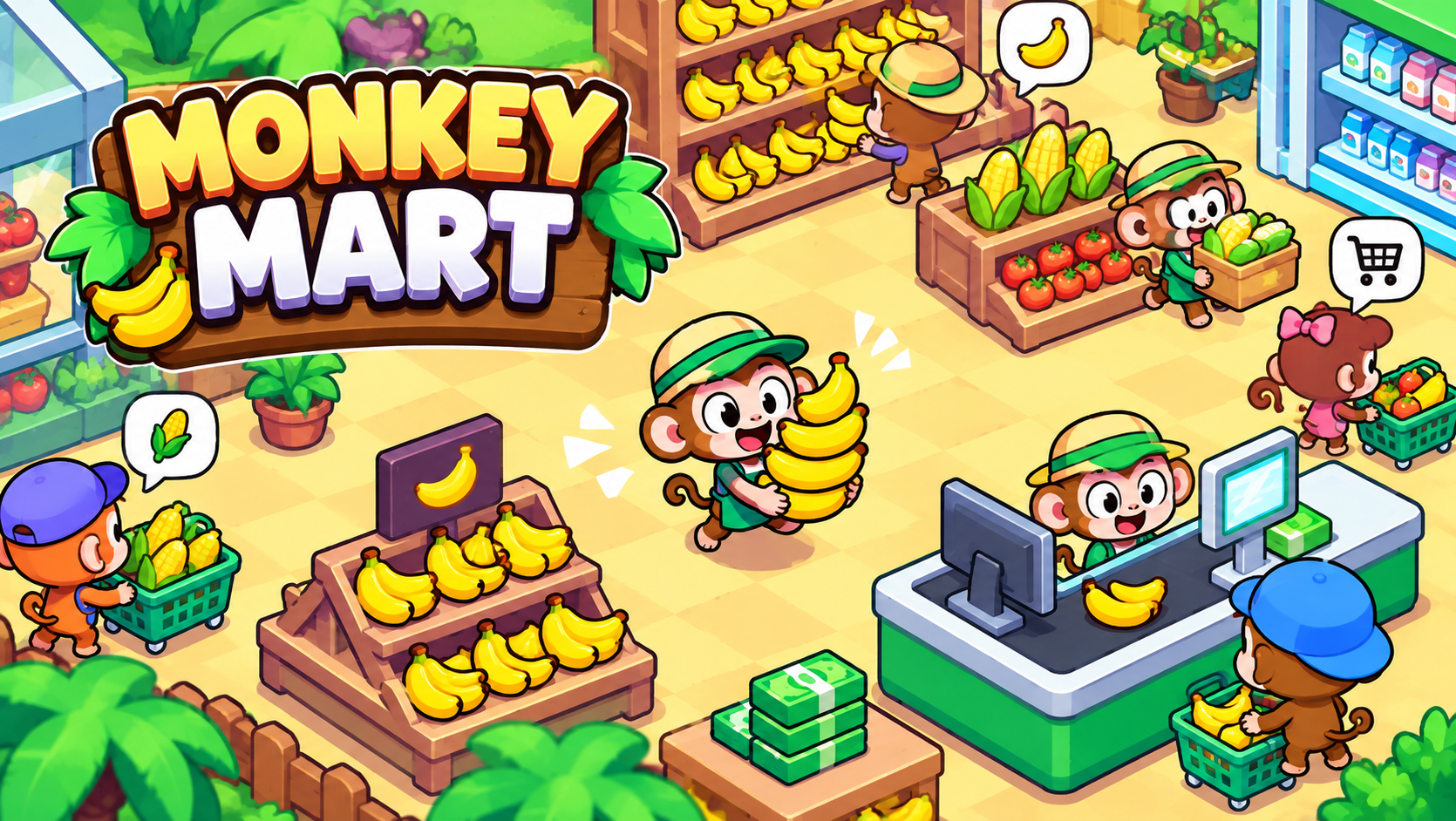
Monkey Mart is a charming, addictive top-down supermarket management and idle tycoon simulator where players step into the paws of an entrepreneurial monkey running a bustling grocery store. Playable directly on Zujoki's free browser games platform, this engaging business simulator provides instant satisfaction with zero downloads, installs, or registration steps. Headlining our popular relaxing casual games collection, Monkey Mart combines the satisfying loop of planting organic crops, stocking shelves, and expanding supermarket aisles across desktop PCs, laptops, tablets, and smartphones alike.

Starting with a modest dirt plot and a single wooden counter, your monkey entrepreneur must plant banana saplings, harvest ripe fruit, stack merchandise on display racks, and collect cash from eager animal shoppers at the checkout register. Every dollar earned is reinvested into building secondary food chains: feeding corn to chickens to harvest eggs, processing wheat into freshly baked bread, and brewing hot coffee for thirsty customers. As store foot traffic surges, managing the logistics becomes a delightful balancing act between farming, stocking, and staff management that appeals to casual thinkers and tycoon enthusiasts alike.

What Is Monkey Mart? TinyDobbins and the Tycoon Craze

Developed by talented indie studio TinyDobbins, Monkey Mart debuted in 2022 and quickly grew into one of the most played web management titles of the decade. TinyDobbins mastered the art of tactile gameplay, giving your monkey avatar energetic animations, responsive movement, and intuitive proximity interactions. Built using lightweight HTML5 and WebGL technology, Monkey Mart loads in seconds, rendering bright cartoon graphics and smooth sixty-frames-per-second performance without taxing your hardware.

What sets Monkey Mart apart from passive idle clickers is its active involvement. Your monkey does not sit idly behind a desk watching numbers tick upward; you actively walk between farm plots, processing machines, and customer aisles to transport goods. You witness the direct physical fruits of your labor as empty shelves fill with colorful produce, long lines of customers smile with satisfaction, and stacks of paper bills pile up at the cash register ready for reinvestment.

Core Objective and the Supermarket Supply Chain

The primary objective in Monkey Mart is to transform a humble fruit stand into an expansive, automated retail empire. Progression follows an engaging economic cycle: harvest raw agricultural products, stock them on sales shelves, cash out customers at the register, and spend profits to unlock new agricultural plots, secondary production appliances, and store expansions.

The supply chain expands naturally through interconnected production tiers:

  • Tier 1: Fresh Produce: Planting banana trees and corn stalks that grow continuously and require simple manual harvesting.
  • Tier 2: Livestock Farming: Using harvested corn to feed farm animals. Chickens consume corn to produce eggs, while dairy cows produce fresh milk.
  • Tier 3: Processed Goods: Combining raw ingredients in automated machines to produce high-value consumer goods, such as baking bread in ovens or brewing iced coffee.
  • Tier 4: Retail Automation: Unlocking automated cash registers, stocking carts, and hiring AI monkey assistants to manage routine store operations while you focus on high-level expansion.

Controls and Device Support

Monkey Mart features an accessible proximity-based movement scheme where all harvesting, stocking, and cashing-out actions happen automatically whenever your monkey stands near an interactive station.

Desktop PC & Laptop Controls

  • Arrow Keys or WASD: Move your monkey around the store, farm plots, and checkout counters.
  • Proximity Interaction: Simply walk up to crops, shelves, or cash piles to pick up, deposit, or collect items automatically.
  • Management Menu: Walk onto glowing upgrade circles to open management menus and invest profits into store upgrades.

Mobile & Tablet Touch Controls

  • Virtual On-Screen Joystick: Drag your thumb across the screen to steer your monkey through aisles and farm rows.
  • Drag-to-Move Gestures: Direct your avatar with fluid touch motions to navigate crowded checkout lines effortlessly.

Managing Employees: Hiring, Upgrades, and the Nap Mechanic

As your market expands to encompass dozens of display racks and multiple production stations, running the entire operation solo becomes impossible. This is where hiring and managing your monkey workforce becomes essential.

Store Stockers: Assistant monkeys dedicated to transporting harvested crops and processed goods from farm plots directly to customer display shelves, ensuring customers never encounter empty racks.

Cashier Monkeys: Dedicated employees stationed at the checkout register to ring up customer orders, freeing you from manual checkout duties so you can focus on store development.

Employee Upgrades: Visiting the management desk allows you to upgrade your staff's performance. You can invest cash to increase their movement speed and expand their carrying capacity, transforming sluggish helpers into lightning-fast stockers.

The Comedic Nap Mechanic: Even hard-working monkey employees get tired. Periodically, your helpers will fall fast asleep on the floor with "Zzz" bubbles floating above their heads, pausing their tasks. When this happens, you must physically walk up to them and bump them to wake them up and send them back to work!

Much like the calculated spatial placement in Blocky Blast Puzzle or puzzle logic in our puzzle games section, optimizing your store layout creates an efficient retail machine.

Store Expansion and Unlocking New Supermarkets

Monkey Mart provides extensive long-term progression that extends far beyond a single building. Once you fully develop your primary supermarket—unlocking all crops, livestock, bakery ovens, and helper upgrades—you unlock the ability to expand into brand-new commercial locations.

Subsequent supermarkets introduce exotic new produce varieties, including sweet strawberries, cocoa beans for chocolate manufacturing, and ice cream churners. Each new store presents a fresh floor layout and higher customer volume, requiring you to rebuild your retail empire with refined management strategies.

Step-by-Step Pro Strategies for Maximum Profit

Build the ultimate monkey retail empire with these eight proven pro management guidelines:

  1. Upgrade Your Personal Carry Capacity First: In the early game, your biggest bottleneck is your carry limit. Invest early cash into upgrading your monkey's carry capacity so you can haul ten or more bananas at once, cutting travel time in half.
  2. Automate the Cashier Counter Early: Standing at the cash register to collect payments wastes valuable time. Hire a cashier monkey as soon as the option unlocks so revenue flows continuously while you restock aisles.
  3. Prioritize High-Margin Livestock Goods: Processed items like eggs, milk, and baked bread sell for significantly higher profits than raw bananas. Prioritize unlocking livestock and keeping feeding troughs full of corn.
  4. Patrol and Wake Up Slacking Helpers: Do not let sleeping assistants linger. Make regular rounds through the backroom and production stations to bump sleeping stockers back to life before shelves run dry.
  5. Keep Production Stations Stocked Ahead of Demand: Animals and ovens take time to produce goods. Never wait until the egg shelf is empty to feed your chickens; keep feed troughs filled so production runs non-stop.
  6. Upgrade Stocker Speed and Capacity in Tandem: Faster stockers with tiny carry limits make too many trips, while high-capacity stockers with low speed crawl across the store. Upgrade speed and capacity proportionally.
  7. Cluster Production Near Corresponding Shelves: When planning layout investments, unlock shelves located close to their production stations to minimize employee walking distance.
  8. Collect Cash Piles Frequently: Cash registers have storage caps. If cash piles grow too high, transactions pause. Sweep past the register regularly to deposit earnings into your working balance.

Common Mistakes and Tactical Fixes

Avoid these common management blunders that slow down store growth:

  • Neglecting Cashier Upgrades: A slow cashier creates massive customer bottlenecks that stretch through your aisles. Fix: Upgrade cashier transaction speed whenever customer lines exceed three shoppers.
  • Expanding Shelves Before Production: Buying new display racks without the supply capacity to fill them leaves customers waiting at empty shelves. Fix: Upgrade farm plots before building extra sales racks.
  • Ignoring Sleeping Stockers: Letting two or three stockers sleep simultaneously halts your entire distribution network. Fix: Walk through employee corridors every sixty seconds to keep workers moving.
  • Hoarding Cash Unnecessarily: Sitting on thousands of uninvested dollars slows growth. Fix: Reinvest all revenue immediately into staff upgrades or new store plots.

Why Monkey Mart Is an Addictive Tycoon Masterpiece

Monkey Mart captures the pure, satisfying magic of retail entrepreneurship without corporate stress. Watching your store transform from a modest roadside fruit stand into an interconnected, automated supermarket empire delivers immense satisfaction.

The cheerful cartoon presentation, accompanied by charming animal customer designs and buoyant sound effects, creates an uplifting atmosphere. Combined with instantaneous browser loading and zero downloads, Monkey Mart stands as one of the most delightful, relaxing management games available online today.

Controls & Key Bindings

Move your monkey around the store, farm plots, and checkout counters.Arrow Keys or WASD
Simply walk up to crops, shelves, or cash piles to pick up, deposit, or collect items automatically.Proximity Interaction
Walk onto glowing upgrade circles to open management menus and invest profits into store upgrades.Management Menu
Drag your thumb across the screen to steer your monkey through aisles and farm rows.Virtual On-Screen Joystick
Direct your avatar with fluid touch motions to navigate crowded checkout lines effortlessly.Drag-to-Move Gestures

Compatibility & Details

Platform
Web Browser (HTML5)
Installation
No download required
Supported Devices
Desktop, Mobile & Tablet
Access
Free to play

Frequently Asked Questions

Everything you need to know about Monkey Mart

5 FAQs

Yes, Monkey Mart is 100% free to play directly in your web browser on Zujoki with zero downloads or installations required.

Yes, Monkey Mart features responsive virtual joystick and drag-to-move touch controls for mobile browsers on iOS and Android.

Walk up to the management desk in your store and spend earned cash to hire worker monkeys, upgrade their carry capacity, and boost their speed.

You start with bananas and corn, then expand to baking bread, brewing coffee, harvesting eggs from chickens, and processing milk from cows.

When monkey assistants fall asleep on the job, walk directly into them to wake them up and send them back to stocking shelves.

Game Tags

monkey mart
supermarket simulator
idle games
management games
tinydobbins
shop tycoon
casual games
free online games
play monkey mart online
unblocked games

More games

Browse all
Stickman Hook
PLAY

Stickman Hook

Arcade0k
Aces of the Sky Epic Dogfights
PLAY

Aces of the Sky Epic Dogfights

Action
Temple Run 2
PLAY

Temple Run 2

Runner
Count Control Legends
PLAY

Count Control Legends

Runner
Repuls Io
PLAY

Repuls Io

Shooter
Paperio 2
PLAY

Paperio 2

Multiplayer

Comments

0
Login to comment

0/500

No comments yet

Be the first to start the conversation.